GD&T PDF Redline Guide

How to create GD&T redlines on a PDF drawing

Create clear GD&T annotations for mechanical drawing reviews without fighting a generic PDF editor. PDF Engineer helps engineering teams add feature control frames, datum callouts, tolerance questions, and release-ready redlines directly on the PDF.

Video walkthrough

Create a GD&T annotation in PDF Engineer

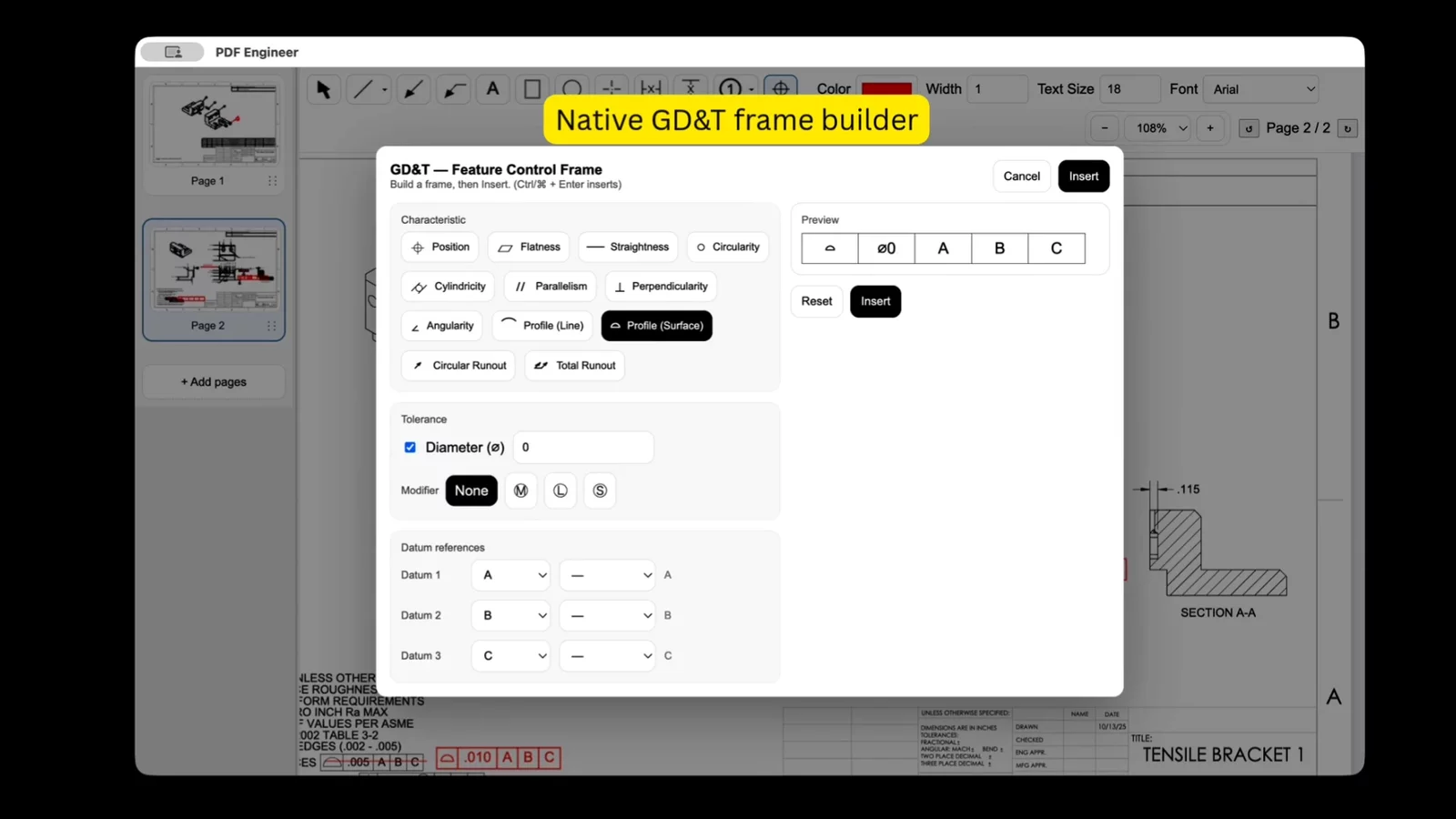
Watch the workflow for adding a GD&T redline to a mechanical PDF drawing, then follow the written steps below when you need a clean feature control frame or datum-related markup.

GD&T feature control frame demo

Step-by-step

How to add a GD&T redline annotation

Use this workflow when a drawing review needs a precise GD&T markup rather than a general comment. It works for tolerance changes, datum questions, inspection notes, and design review feedback.

Step 1

Open the engineering drawing PDF

Start with the drawing, supplier package, inspection print, or ECO review file you need to mark up. PDF Engineer keeps the workflow in a standard PDF so the redlined drawing can move through your existing review process.

Step 2

Select the GD&T annotation tool

Choose the GD&T tool when the redline needs a geometric tolerance symbol, feature control frame, datum reference, or tolerance-related clarification instead of a generic text box.

Step 3

Build the feature control frame

Enter the symbol, tolerance value, material condition modifier, and datum references needed for the redline. Keep the annotation focused so the reviewer can understand the requested change without decoding a long note.

Step 4

Place the annotation near the affected feature

Click near the dimension, callout, or view that needs attention. Use the redline as a review mark, not a hidden side comment, so design, manufacturing, and quality teams see the context immediately.

Step 5

Add a leader, note, or supporting markup

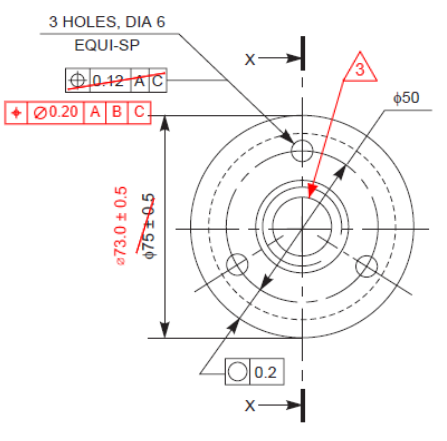
Use leaders and short notes when a GD&T frame needs extra context, such as asking for a datum scheme clarification, pointing to a specific hole pattern, or separating design intent from inspection feedback.

Step 6

Export the redlined PDF

Save or export the marked-up drawing as a standard PDF that can be shared with teammates, suppliers, document control, or anyone reviewing the next drawing revision.

Why it matters

GD&T markups need engineering context

A GD&T redline is more than a box on a page. It tells reviewers which feature, tolerance relationship, datum scheme, or inspection requirement needs attention. PDF Engineer keeps those markups close to the drawing geometry so a reviewer does not have to connect scattered comments back to the print.

  • Keep the GD&T redline close to the dimension, feature, or view that needs attention.
  • Use a leader when placement alone could make the target feature ambiguous.
  • Separate formal GD&T changes from reviewer questions so the next action is clear.
  • Review the exported PDF before sending it to suppliers or document control.
Mechanical PDF markup example in PDF Engineer

Use cases

When to create GD&T redlines

GD&T annotations are useful whenever drawing feedback needs to be precise enough for design, quality, manufacturing, and supplier teams to act on the same page.

Drawing release reviews

Call out tolerance questions before a print goes into release, purchasing, or production planning.

Supplier clarification packages

Send a clean PDF markup when a vendor needs context on datum references, tolerance zones, or inspection requirements.

ECO and ECR redlines

Document requested GD&T updates directly on the drawing page that triggered the engineering change.

PDF Engineer document actions for engineering drawing reviews

PDF workflow

Keep the redline package easy to share

PDF Engineer is designed for mechanical drawing review workflows where the marked-up PDF still needs to travel. Create the annotation, combine it with the rest of the review package when needed, and send a standard PDF to the next reviewer without forcing them into your CAD environment.

Download PDF Engineer

FAQ

GD&T redline questions

Can I create feature control frame redlines in PDF Engineer?

Yes. PDF Engineer is built for mechanical drawing redlines, including GD&T-style annotations such as feature control frames, symbols, tolerance values, and datum references.

Is this for editing the native CAD drawing?

No. PDF Engineer creates redlines on a PDF drawing. Use it to communicate requested changes, questions, and review notes before the controlled drawing is updated in CAD or your document system.

Can I share the finished GD&T markup with suppliers?

Yes. The marked-up output is a standard PDF, so it can be shared in the same review, supplier, quality, or document control workflow you already use.

When should I use a GD&T annotation instead of a text note?

Use a GD&T annotation when the review comment is about geometric tolerance, datum references, feature control frames, or inspection intent. Use a short text note when you only need plain-language context.
PDF Engineer
Built for engineers who live in drawings.
© 2026 PDF Engineer. All rights reserved.